Feature Label 3

0
Getting start with Python | Mozilla science Lab Getting start with Python | Mozilla science Lab

Sylhet Engineering College Study group organized an event named "Getting Started with Python" . We introduce students with Mozill...

0
Firefox OS App day | Sylhet Engineering College Firefox OS App day | Sylhet Engineering College

An awesome "Firefox OS App day " has been held in Sylhet Enginering  College campus,Sylhet,Bangladesh. It was really festive e...

0
Ten years of evolution of MDN !! Ten years of evolution of MDN !!

 Mozilla proudly celebrates the  10th anniversary  of the  Mozilla Developer Network , one of the richest and also one of the few multilin...

0
WebMaker With Kids Of Building at Nalitabari WebMaker With Kids Of Building at Nalitabari

WebMaker With Kids Of Building at Nalitabari  The Maker party season have come again . Maker Party...

0
SEC StudyGroup has been Established SEC StudyGroup has been Established

   SEC StudyGroup has been Established A Mozilla Science Study Group has been established in Sylhet Engineering College  name...

0
How to see saved password in Mozilla Firefox? How to see saved password in Mozilla Firefox?

How to see saved password in Mozilla Firefox? When we browse different browsers, we keep on accessing various websites. With the same fl...

Tuesday, September 15, 2015

Getting start with Python | Mozilla science Lab

Sylhet Engineering College Study group organized an event named "Getting Started with Python" . We introduce students with Mozilla Science Lab , we discussed about its mission and vission . All the students were so interested, they find a platform as they can learn,share,discuss with new educational/scientifical topic besides their academic studies.


On that program we started learning Python. we discussed what about is python ? how to they can make a project with knowledge of python . we found some new people who are interested to research besides their academic study they find Mozilla Science Lab as a best platform.

I also introduce them with Study Group Lesson repo . They were glad , because they find some lessons in native language also . we also agreed for getting together again for discussion about our study group progress. at last I thanked them  for joining us .

Link : http://sylhet-engineering-college.github.io/studyGroup/

Sunday, September 13, 2015

Firefox OS App day | Sylhet Engineering College

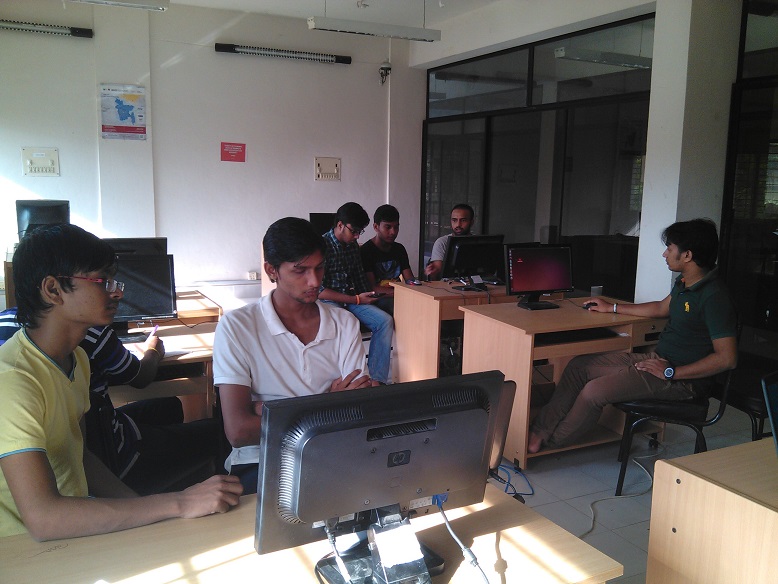
An awesome "Firefox OS App day " has been held in Sylhet Enginering 
College campus,Sylhet,Bangladesh. It was really festive environment , all 
the students was so interested about Firefox OS.


I went in the event spot in time, Then we setup Lab . we provide necessary
softwars and programs to every students. Then the event was started . I
briefed them about "Firefox OS" , "Firefox Marketplace" .They were very
happy because they find it(Firefox OS) so friendly with a web based
platform . they learn about writing a menifest file for Firefox OS App.


Then the task of App developing has been started . all the people were
so creative with some inovative ideas . they start writing awesome and
cool apps . we provided them light snacks at break.


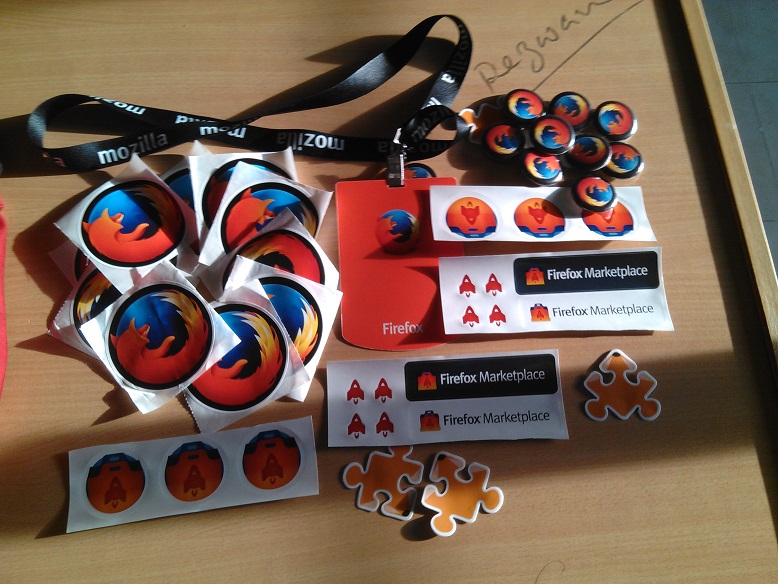
Swag time!! all the participate got awesome swags, that was really so
charming environment .After that all the apps were going to our judge panel
, they find out the best app from all submission . then the best developer
was awarded by us . then I thanked everybody for joinning us in this
Awesome Firefox OS App Day .


Flicker Link :

https://www.flickr.com/photos/132326362@N02/albums/72157658564707791

Apps Link : https://github.com/bolaram/Firefox-OS-App-Day

Event Link : https://reps.mozilla.org/e/firefox-os-app-day-1/


Sunday, July 26, 2015

Ten years of evolution of MDN !!

 Mozilla proudly celebrates the 10th anniversary of the Mozilla Developer Network, one of the richest and also one of the few multilingual resources on the Web for documentation. It started in February 2005, when a small team dedicated to the open Web took DevEdge(Netscape’s developer materials) and set out to create an open, free, community-built online resource for all Web developers. Just a couple of months later, on 23 July, 2005 the original MDN wiki site launched and has evolved steadily ever since for the convenience and the benefit of its users.
MDN_10-Milestones_UK
Today, ten years later, not only has the amount of documentation grown – 34,500 documents and climbing – but also MDN’s global volunteer community is bigger than ever. Currently, MDN has more than 4 million users and over 1000 volunteer editors per month creating and translating documentation, sample code, tutorials and other learning resources for all open Web technologies, including CSS, HTML, JavaScript and everything that makes the open Web as rich and versatile as it is.
MDN_10_Facts_UK
For a wide range of Web developers, from learners to hobbyists to full-time professionals, MDN provides useful explanations for coding practice. It aims to inspire ideas, encourage collaboration, innovation and ultimately, foster the growth of the open Web. Moreover, as the digital industry flourishes and the demand for coding skills at young age rises, the importance of well-organized resources like MDN grows exponentially. That is why in 2014 MDN started to feed and expand all its learning pages into a “Learn the Web” area for beginning web developers, including a web terminology glossary, which MDN’s technical writers and volunteers will continue to develop over the next years.
All these efforts, which would not be possible without the active MDN volunteer base, are being greatly acknowledged by developers from all over the world who would not be doing what they do without MDN – or at least not as good.
Currently, MDN has over 4 million users per month and more than 1000 volunteer editors per month, worldwide. In July 2015, MDN will celebrate its 10th anniversary, as the original MDN wiki site launched on 23 July, 2005.   
Hashtag: 
My Contribution On MDN :
My Demo preview: Lotus Focusing
For more information:

Wednesday, July 15, 2015

WebMaker With Kids Of Building at Nalitabari


WebMaker With Kids Of Building at Nalitabari 


The Maker party season have come again . Maker Party is Mozilla’s global campaign to teach the web to all kinds of people around the world. This year I become a part of the festive global Maker party.I make this party with kids.at the party time they made lot of fun with webmaker. I taught them how easy way they can make a content in Web easily.


Even they made some Webcontent they also build some content with pen,paper,gum,markar etc. they enjoyed and learnt more from this programme. 

 their makes links :


Tuesday, July 7, 2015

SEC StudyGroup has been Established

   SEC StudyGroup has been Established


A Mozilla Science Study Group has been established in Sylhet Engineering College 
named "SEC Studygroup" . the main aim of this group make all the student closer 
to discuss about something new,creating something new.


All the student here can able express their opinion on what they want to 
learn besides their academic work.they also can provide lesson and discuss that among them.


Study Group Link : SEC StudyGroup

Sunday, July 5, 2015

How to see saved password in Mozilla Firefox?

How to see saved password in Mozilla Firefox?

When we browse different browsers, we keep on accessing various websites. With the same flow continuing both in home and at office, we tend to forget many such useful links and then try to bookmark them, similarly a sort of save password option can be kept on action too. At times, we miss keeping a track of the passwords that we assign to various websites. So we sort of start saving the passwords for further future use. Now the process being not that difficult to get the access back and retrieve the data of passwords, let’s take a deep look on how to manage the methods with few steps. Mozilla Firefox saved passwords backup, can be retrieved from such small exercises performed at the front end.
mozilla firefox support number
Carefully take a look on the process as to how to save password in Mozilla Firefox without asking again. Start accessing the enlisted steps to get the data at the required period of time-

  1. Open the Mozilla Firefox browser on your system, Click the menu and select the Options command.
  2. Select security panel from the list of Options command.
  3. Click Saved Passwords as visible at the lower right hand corner of the application. Actions you can perform from the same menu button are listed below-

 How to see saved password in Mozilla Firefox

How to save username and password in Mozilla Firefox:

  • How to remember password in Mozilla Firefox –
To check the already saved passwords- click Show Passwords. Once, you close the browser window the password is saved.

  • How to get password from Mozilla Firefox –
There is a search button to search for the specific website of User you are interested in visiting the page.

  • Firefox remove saved password –
Click “Remove to saved passwords” from the browser for a specific or selected website or user. Moreover Click Remove All to remove every possible saved password for websites and users across the browse.
The password used for any particular website should be maintained and monitored on a regular basis. It helps in retrieving data without any damage or loss to the data selected. In such a way you can actually learn how to save password in Mozilla firefox or how to set password in Mozilla Firefox without getting hacked or harmed by any other third party. It not only helps in reducing the effort of memorizing password for all but also helps in reducing the time spent to set the parameters for accessing a website or application.